In enterprise low-code development, calling external REST APIs is an essential capability for enabling seamless data exchange and integration across systems. While some platforms rely on rigid OpenAPI (Swagger) specifications or proprietary connectors, these can restrict your flexibility and limit direct control over HTTP interactions.
Although IM-LogicDesigner provides dedicated integration tasks for platforms like Office 365, UiPath, and IM-Copilot, its User Definition Task unlocks unconstrained REST API consumption. Bridging the gap between low-code simplicity and pro-code flexibility, this feature empowers developers to move beyond rigid connectors and achieve the following:
- Dynamically construct endpoints using runtime variables.
- Process raw binary payloads directly.
- Manage complex, stateful authentication flows across multiple steps.
The Basics of REST API
Let’s dive into how you can configure and execute unconstrained REST tasks within your IM-LogicDesigner flows.
[!Note]
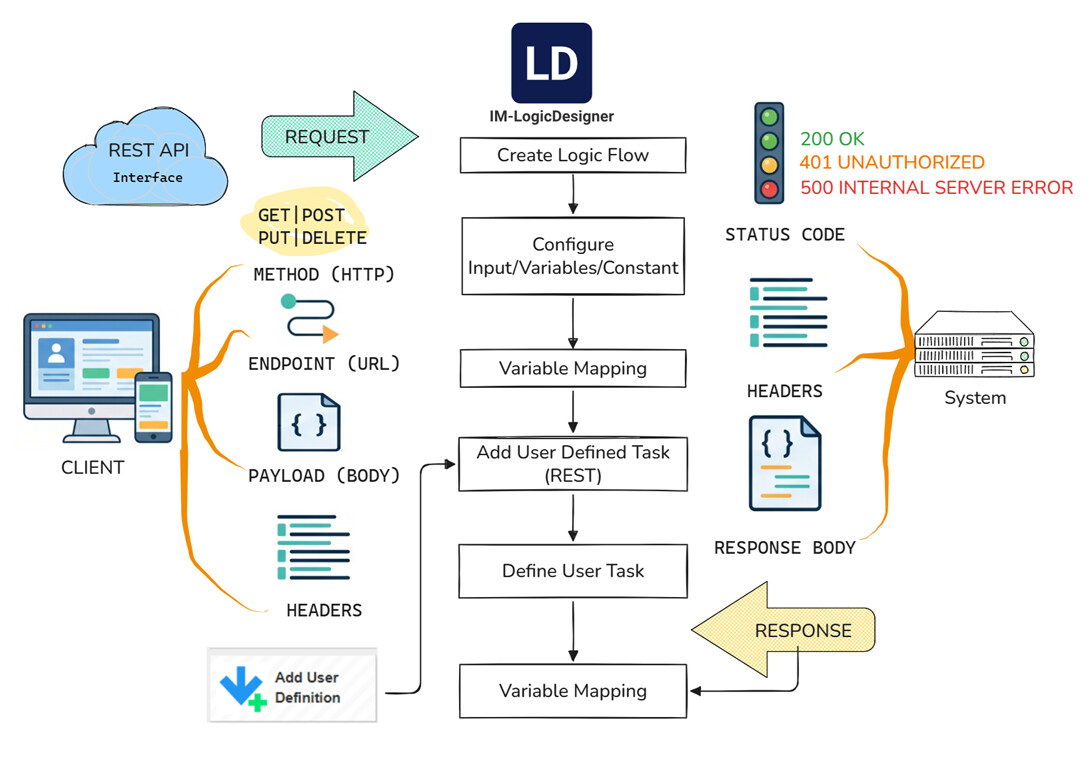
At its core, every REST API data exchange is a simple, standardized conversation. To initiate a request, you must define four foundational elements:
- Endpoint: The URL pinpointing your exact target resource.
- Method: The action you want to execute (e.g., GET, POST, PUT, DELETE).
- Headers: The metadata governing the call, such as authentication tokens and content types.
- Payload: The actual data body you are transmitting, most commonly formatted as JSON.
In return, the service completes the exchange by providing three components:
- A Status Code indicating the result of your request.
- Response Headers.
- The Response Body containing the requested data.
Within the IM-LogicDesigner User Definition Task, a dedicated REST task centralizes your API configuration into a single, streamlined interface. You can control the entire data lifecycle using the task’s native mapping settings, or by placing Variables Operation Tasks before and after the API call. Because payloads are flexibly constructed within custom-designed body objects, you can easily:
- Streamline Inputs: Focus exclusively on mapping the mandatory fields required by the external system.
- Filter Outputs: Parse and extract only the specific response data you need for your process.
Ultimately, your REST API calls are transformed into modular, plug-and-play tasks. This creates highly reusable components that can be seamlessly dropped into complex, large-scale logic flows.
Practical REST Design: Building an AI Agent Router
Let’s walk through an AI agent Large Language Model (LLM) call scenario to see how the REST User Definition functions in practice. To build truly robust AI agents, we must move beyond the limitations of relying on a single LLM provider. Modern agent design dictates that your system must be able to freely and intelligently switch between specialized models—whether they are multimodal, chat-optimized, or embedding models—depending on the task at hand. The primary challenge here is maintaining flexibility.
Dynamic Request Construction (Endpoint & Payload)
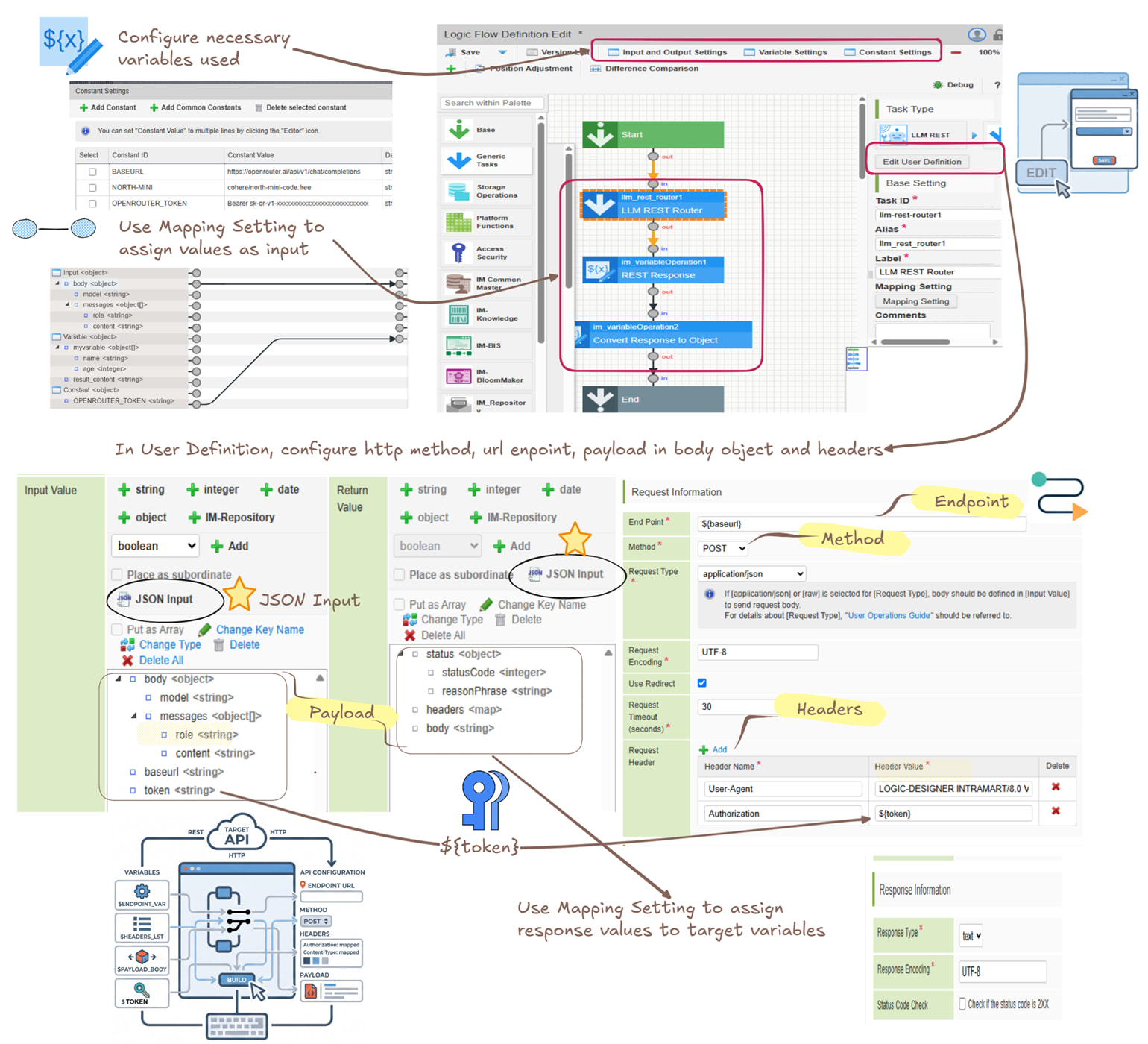
To maintain total flexibility across different AI providers, avoid hardcoding your destinations. Instead, define the endpoint as a constant (e.g., ${baseurl}). You can add multiple base URLs depending on how many LLM providers you need to integrate. Similarly, map the target LLM into the model field of your body object. This approach allows a single REST definition to serve multiple purposes simply by passing different variables at runtime.
Secure and Scalable Credential Management
Next, it is crucial to enhance security. Instead of exposing API keys directly in your logic, define them within the Constant Settings. This allows you to effortlessly manage multiple keys for different LLM providers and securely pass them into the request header (e.g., Authorization: ${token}). You can easily update them when necessary in single place.
[!Tip]
Within the same logic flow, multiple REST user tasks are handled as the same HTTP client. Therefore, if the response of the request destination includes the Set-Cookie header, subsequent REST clients will also send out cookies if the destination is the same.
Seamless Data Orchestration
Finally, you will need to carefully tailor the payload’s data structure. Within the Edit User Definition menu, under the Input Value and Return Value sections, you can precisely define your JSON parameters:
- Input Flexibility: You have the choice to map out the entire JSON specification or isolate only the mandatory fields required by your business logic.
- Return Values: By default, the system predefines the return values for the
status(object),headers(map), andbody(string). - Handling the Body: If the response data structure is consistent across your chosen LLM vendors, you can simply change the
bodydata type to an object and compose the data structure according to the specification. Alternatively, you can leave thebodyas a string, pass it to a variable after the User Definition Task, and use aparseJsonfunction in Variable Operation to convert it into an actionable object later in your flow. This makes the task highly adaptable to a diverse range of business requirements.
[!Tip]
When composing the data structure for your variables or payloads, don’t forget to use the JSON Input shortcut. This is a massive productivity booster, especially when dealing with deeply nested objects. Simply paste a sample JSON payload, and the system will automatically generate the structure and assign the appropriate data types for you to fine-tune.
Validate the REST API Execution
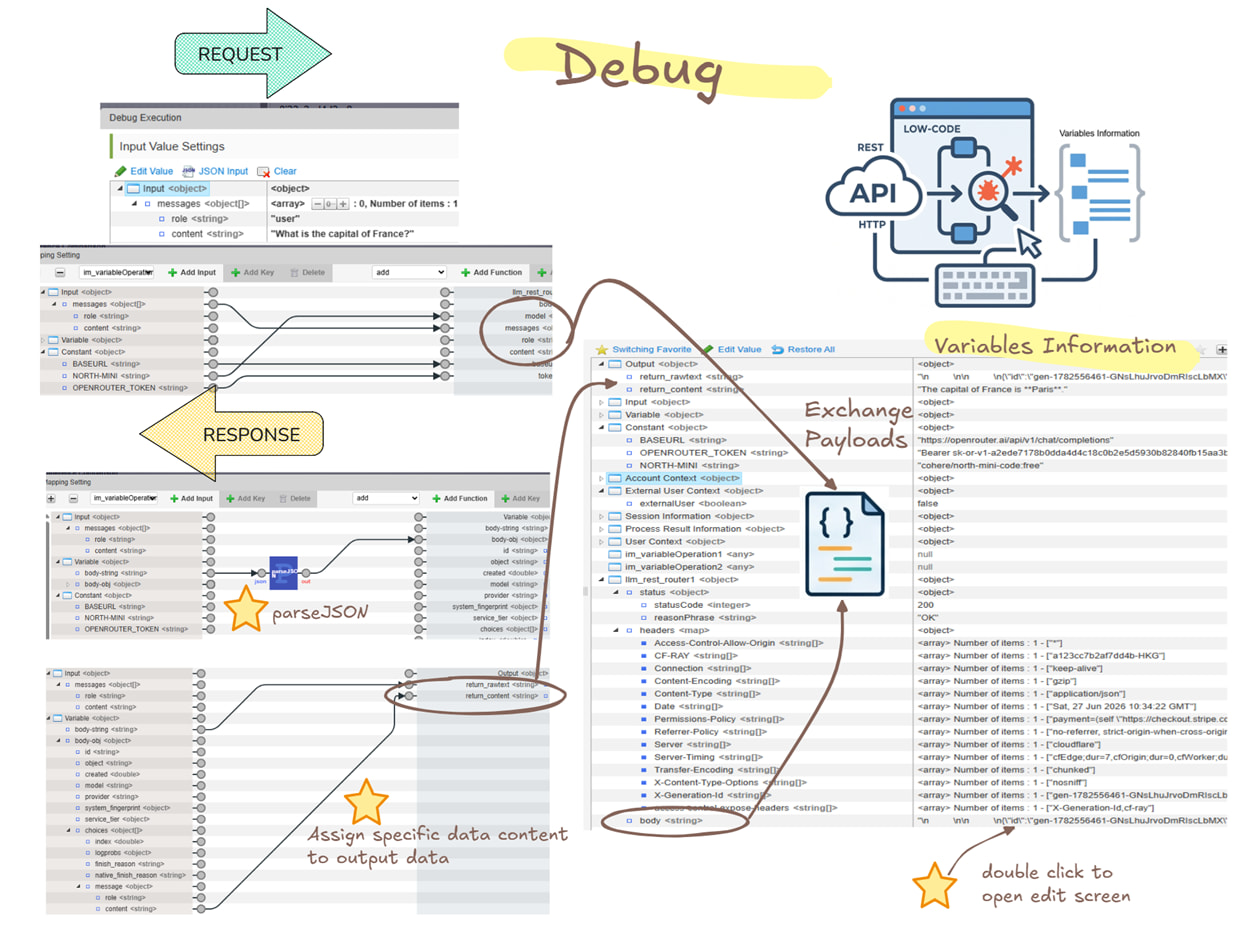
By configuring your Logic Flow appropriately, you are essentially constructing a powerful LLM Router. Let’s explore how to validate this REST task. In the Debug tab, you can set a message object in the input values and execute the flow to pass the model and base URL to the REST User Definition. After the REST API data exchange is complete, Variable Operations will manage the body string conversion and assign the message content to an output value.
You can trace the full details of your response directly within the Variable Information section of the Debug interface. Here is how you can effectively troubleshoot and review your data:
- Identify Errors: If the integration encounters a communication error, you can check the
StatusCodeandreasonPhraseto quickly diagnose the issue. - View Full Responses: To read the complete details of a return response, simply double-click the data value of
body. An Edit pop-up screen will appear, allowing you to read the full content from the table cell. - Step-by-Step Tracing: The Debug tool provides both Execute and Execute Steps options. Using Execute Steps allows you to trace how variable values change at each individual stage of your entire logic flow.
This is just a straightforward example of a REST API call. Because the endpoint, headers, and body are customizable, it reserves room to extend this architecture to multiple systems with varying data structure requirements.
[!info]
For more details on the REST user definition, please refer to the IM-LogicDesigner Specification and the CookBook: Leverage REST user-defined tasks to use models not supported by IM-Copilot’s standard
We’d love to hear from you—share your own REST integration patterns or tell us which external systems you’ve successfully connected using the User Definition Task!