Introduced in 2019, IM-BloomMaker is a powerful low-code development tool within the intra-mart Accel Platform (iAP) designed to streamline frontend application development through an intuitive graphical interface. While it is widely celebrated for its drag-and-drop screen construction and responsive web design capabilities, what truly sets BloomMaker apart is its ability to seamlessly bridge visual design with diverse backend actions, facilitating the agile development of complex layouts.
As web applications evolved from static, server-rendered pages to highly interactive Single Page Applications (SPAs), BloomMaker emerged as iAP’s definitive response—shifting the paradigm toward a Data-Driven, Reactive Approach to frontend development.
 Development Workflows: IM-BloomMaker vs. IM-BIS / Forma Designer
Let’s look at how the development workflow in BloomMaker differs from traditional low-code tools like IM-BIS and Forma Designer:
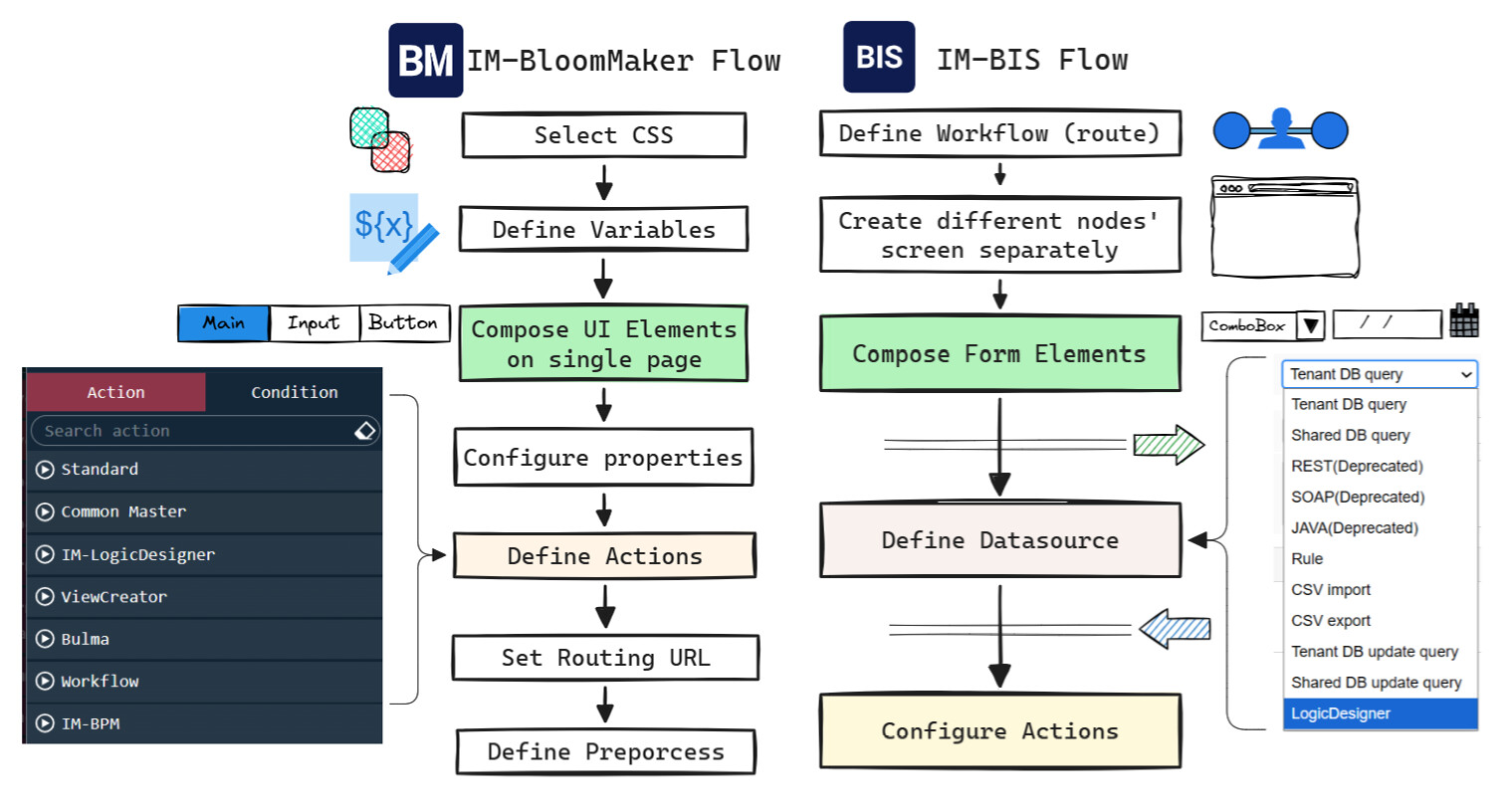
- In IM-BIS / Forma Designer: Action settings are typically configured directly on individual UI components, while business logic is defined and managed externally via datasource configurations.
- In IM-BloomMaker: The focus is on building versatile user interfaces that support a wide range of use cases—such as dynamic dashboards or multi-step processing screens using page tabs. Designers can invoke actions directly on the design surface while arranging frontend components within the visual editor.
When business logic does not need to be reused across different applications, developers can embed custom scripts or invoke REST APIs directly through BloomMaker actions. This dramatically increases development flexibility and enhances the overall developer experience.
Unlike traditional intra-mart screens built with JSSP (JavaScript Server Pages) or UI component tags that rely on server-side rendering, IM-BloomMaker leverages Vue.js as a core third-party library to render screens dynamically on the client side. BloomMaker has transformed intra-mart’s frontend capabilities by adopting Vue.js for reactivity, Bulma for CSS layouts, and a JSON/REST paradigm for backend data exchange.
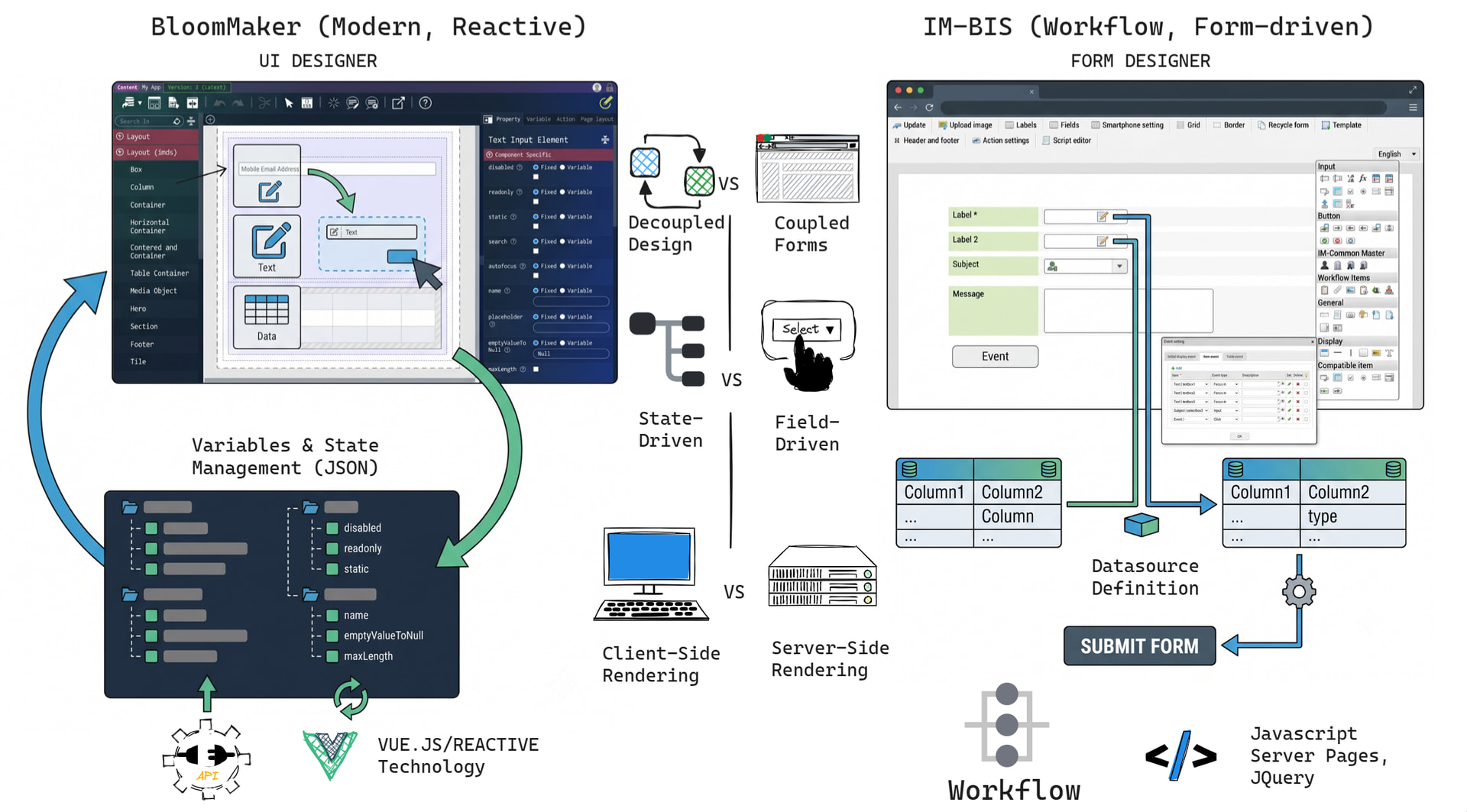
 The Paradigm Shift: Two-Way Data Binding
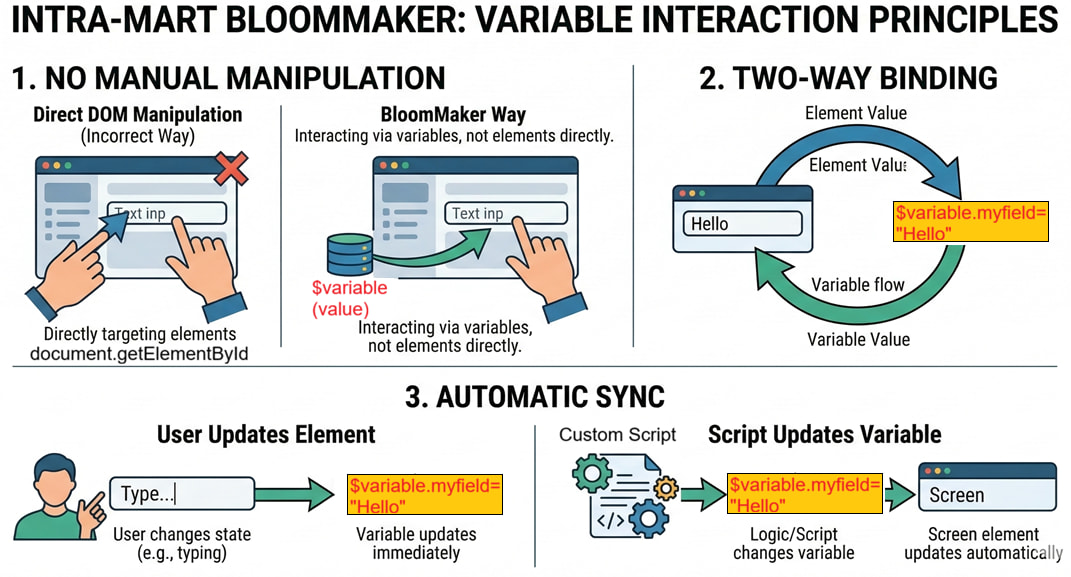
IM-BloomMaker strictly prohibits direct DOM manipulation. You cannot use standard browser APIs like document.getElementById() to manipulate the screen state. Instead, all dynamic visual changes must be managed entirely through variables via two-way data binding.
BloomMaker utilizes several built-in variable prefixes to manage state:
| Name | Usage |
|---|---|
| $variable | Standard data binding where values can be both retrieved and assigned. |
| $constant | Fixed values that remain unchanged during execution. |
| $input | Handles data values specifically received from server-side logic. |
| $i18n | Employed for internationalization to support multiple languages. |
| $env | Manages environment-specific configuration data. |
| $index | References the current index when looping through arrays in repeating elements. |
| $im | A global platform object used to perform specialized operations, such as $im.resolve. |
| Fraction | A specialized internal class native to IM-BloomMaker for high-precision data handling. |
[!Note]
A Variable Path is IM-BloomMaker’s specialized data-binding format. It acts as an “address” that connects the variables you create visually in the designer to your UI components and custom scripts. They always begin with the
$symbol.
Variable Path vs. General JavaScript Variables
| Feature | General JavaScript Variable | IM-BloomMaker Variable Path |
|---|---|---|
| Scope | Controlled by let, const, or var within functions/modules. |
Defined globally within the BloomMaker content and accessible via specific prefixes. |
| Data Binding | Static by nature; changing a variable does not automatically update the UI without an external framework. | Two-way binding is native; updating the path automatically redraws all linked UI elements. |
| DOM Interaction | Often combined with the DOM API to manually manipulate and update screen elements. | Direct DOM manipulation is prohibited; the variable path is the only way to change the UI. |
| Complex Types | Arrays and Objects can be manipulated directly with native JS methods (e.g., .push()). |
Accessing arrays/maps directly returns a “special object” to optimize performance; $im.resolve is required for native operations. |
| Built-in Functions | Limited to standard JavaScript web APIs and libraries. | Includes platform-specific global objects like $im for specialized operations and the Fraction class. |
 Mastering
 $im.resolve
In custom scripts, while you can read primitive values directly using $variable.propertyName, there are critical scenarios where you cannot bypass the use of $im.resolve.
Because BloomMaker wraps complex types in specialized Proxy objects to track reactive changes, standard JavaScript operations will break without explicit resolution. There are three primary use cases for $im.resolve:
- Enables Native Javascript Methods
The Problem: Direct access to an array or map returns a proxy shell. Consequently, native functions likeArray.forEach(),.map(), orObject.keys()will either fail or return empty results.
The Solution:$im.resolveunwraps the proxy into a plain JavaScript Array or Object, allowing standard methods to behave normally.
Sample 1: Iterating over an Array
Direct access returns empty objects during loops. You must resolve the array first.
// ❌ BAD: Direct access
// Result: Logs empty objects {}, {}, {}
$variable.userList.forEach((user) => {
	console.log(user);
});

// ✅ GOOD: Resolve first
// Result: Logs actual data {name: "John"}, {name: "Jane"}
const nativeArray = $im.resolve('$variable.userList');
nativeArray.forEach((user) => {
	console.log(user.name);
});
Sample 2: Extracting Map Keys via Object.keys()
// ❌ BAD: Direct access
// Result: [] (Empty array)
const keys = Object.keys($variable.myMap);

// ✅ GOOD: Resolve first
// Result: ["id", "status", "date"]
const realObject = $im.resolve('$variable.myMap'); const realKeys = Object.keys(realObject);
- Ensures Complete Deep Data Copying
The Problem: Directly assigning one map variable to another ($variable.dest = $variable.src) copies only the reactive pointer/proxy shell. This often leads to data loss, leaving the destination keys holdingnullvalues.
The Solution:$im.resolvefetches the deeply evaluation data set, ensuring a clean value copy.
Sample 3: Copying Complex Data (Map to Map)
Direct assignment often results in data loss (nulls).
// ❌ BAD: Direct assignment
// Result: Destination has keys, but values might be null
$variable.backupData = $variable.currentData;

// ✅ GOOD: Resolve source before assigning
// Result: Full deep copy of values
$variable.backupData = $im.resolve('$variable.currentData');
- Handles Dynamic Indexes
The Problem: You cannot evaluate the dynamic row variable$indexdirectly inside a raw JavaScript string path evaluation (e.g.,$variable.list[$index]will fail to resolve in standard script actions).
The Solution:$im.resolvedynamically parses the string path, substituting$indexwith the exact row integer (0, 1, 2, etc.) relative to the UI element that fired the event.
Sample 4: Utilizing $index in Repeating Elements
If you click a button inside a list (Repeat element), you need $im.resolve to know which row was clicked.
/*
Scenario: A user clicks a button on the 2nd row (index 1).
Because this script is triggered by the button's action, IM-BloomMaker
automatically provides the "Execution Context" (the row's index).
Unlike standard JavaScript, there is no need to manually pass the event
or traverse the DOM to figure out which row was clicked.
*/
// 1. Get the current index number
const currentIndex = $im.resolve('$index'); // Returns 1.
// 2. Get a specific value from that row using the index
// The string '$index' is automatically replaced by '1'
const rowValue = $im.resolve('$variable.listData[$index].amount');
// 3. Update a specific value in that row
$im.resolve('$variable.listData[$index].status', 'Approved');
[!warning] Performance Warning
Use$im.resolvejudiciously. Because it forces the browser to synchronously evaluate and construct the entire deep dataset, running it against massive collections (e.g., datasets with over 10,000 records) can temporarily lock or freeze the browser UI thread. Only invoke it when you absolutely need to process or manipulate the full underlying native collection.
[!info]
For more details regarding the custom script, you can refer the IM-BloomMaker Tutorial Guideand IM-BloomMaker User Operation Guide